Posts

Showing posts with the label DB Scripts

How to create Oracle stored Procedures using TOAD for Oracle

Image
In a database management system, a stored procedure is a set of Structured Query Language (SQL) statements with an assigned name that's stored in the database in compiled form so that it can be shared by a number of programs. The use of stored procedures can be helpful in controlling access to data, preserving data integrity and improving productivity. The Oracle PL/SQL language allows you to write procedure to centralize the business logic and store the code in the database. I have created the following Stored Procedure on Oracle using TOAD. This particular Stored Procedure will Insert a Customer to the Customer Table. For the sake of simplicity, Customer Table contains only 4 columns (Customer ID, Customer Name, City and Contact No). In this post I will show you how to create Oracle stored Procedure using TOAD.  Connect to Oracle Database using TOAD. Click on Database menu and open Schema Browser.
Set the Urdu Supported Character Set in Oracle Database

Image
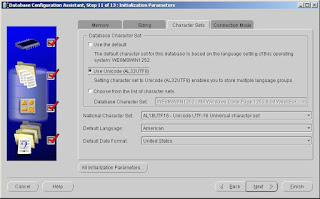
Last week my Team Lead gave me the task to Store Urdu in Oracle Database (for sending SMS). For this purpose I have created a database through Database Configuration Assistant (dbca) and on Initialization Parameters step picked the Use Unicode (AL32UTF8). Setting character set to Unicode (AL32UTF8) enables you to store multiple language groups. Set the National Character Set AL16UFT16-Unicode UTF-16 Universal Character Set as shown below. After database creation set the NLS_LANG parameter of Oracle Database on Window’s Registry as shown below. Data value should be AMERICAN_AMERICAN.AL32UTF8. After this restart the Services of Oracle Database and TNS Listener. To verify the NLS Database Parameters execute the following query. select * from nls_database_parameters where parameter = any('NLS_CHARACTERSET','NLS_NCHAR_CHARACTERSET'); To store the Urdu character sets I set the column datatype NVARCHAR and completed the first face of my project task succes...

Which perform faster in Oracle Database IN or EXISTS

EXISTS  is always perform faster in Oracle Database because “ EXISTS ” returns a boolean value (True or False), whereas “ IN ” returns a value.

What is Anonymous PL/SQL block in Oracle

An anonymous PL/SQL block is a block of code that is not stored in the database. When submitted to the database, the code will be executed immediately. An anonymous PL/SQL block always starts with DECLARE or BEGIN. Example: BEGIN    dbms_output.put_line (' Hi, this is anonymous PL/SQL '); END; /

Important Shell Scripting Questions with Answers

What is $*? Its mainly used for showing up all params. This show all parameter values passed in shell script What does $# stand for? # will return the number of parameters that are passed as the command-line arguments. What does $? Return? $? will return exit status of command .0 if command gets successfully executed ,non-zero if command failed. What are Different types of shells? sh : the oldest shell csh : C shell ksh : Korn Shell bash : bourne again shell  How do you read arguments in a shell program – $1, $2? Shell script accepts parameters in following format… $1 would be the first command line argument, $2 the second, and so on $0 is the name of the script or function If your script has more than 9 params then accept in following way… ${12} : 12th param ${18} : 18th param What are the different kinds of loops available in shell script ? for, if, while, case What is the difference between a shell variable that is exported and the one that is not exported?...

Oracle User Creation and Management

Image
1) As a competent DBA, before creating a new user to check the following items: * Determine the object must be stored in the user table space; * Determine the quota for each table space; * Give the user the default table space and temporary table space; * Create a user; * The user system privileges and roles required to give users; 2) The following example creates a user:     create user infotech - -to create a user name for the infotech;     identified by infotech -- the user's password is infotech;     default tablespace APEX_SPACE -- the user's default table space is APEX_SPACE;     temporary tablespace temp --the user temporary table space is pioneer_temp;     quota 30m on APEX_SPACE --the user to use up to 30M in APEX_SPACE space;     quota 30m on users --the user in the users table space to use up to 30M of space;     password expire --the first time the user l...

Important Oracle Scripts for Database Administrators (Part-2)

Image
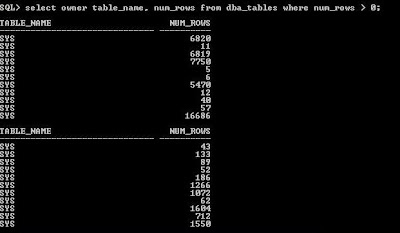
Show row counts for all tables that have Analyze ON select owner table_name, num_rows from dba_tables where num_rows > 0; Select all users active in the System select sid, serial#,user#, Username, machine, program, server, status, command, type from v$session order by username;   Show what a current user is doing select sid, serial#, status, server from v$session where username = 'SHAHEER'; Create count for all tables select 'Select count(*) from ' ||owner|| '.' ||table_name|| ';' from dba_all_tables order by owner, table_name; Show all indexes select owner, index_name, table_type, tablespace_name from dba_indexes where   owner <>'SYSTEM' and owner <> 'DBSNMP' and owner <> 'ORDSYS' and owner <> 'OUTLN' and owner <> 'SYS' and owner <> 'SYSTEM' order by owner, index_name, tablespace_name; Show all tables select owner, table_name, table_type, tablespace_name fr...

Important Oracle Scripts for Database Administrators (Part-1)

Image
In this artical i want to share some very useful scripts for Oracle Database Administrator. Security Grants grant select on 'TABLE NAME' to public with grant option; select * from dba_tab_privs where TABLE_NAME = 'TABLE_NAME' select * from dba_role_privs where granted_role = 'PORTMAN_TABLE' Resizing A Data File alter database datafile '/u04/oradata/wpk/temp01.dbf' resize 200m; Show All Product Information select * from product_component_version;

Find Used Size in a table

Image
This script contains the query to get the size (size) used by a table in MB  SELECT    segment_name           table_name,       sum(bytes)/(1024*1024) table_size_meg FROM  user_extents WHERE segment_type='TABLE' AND  segment_name = '&table_name' GROUP BY segment_name

How to Show Used/Free Tablespace Space in Oracle DB

Image
This script will list tablespace wise free space and used space (also total size) as well as total space. For running this query you must have SELECT privileges to SYS.DBA_FREE_SPACE, SYS.V_$DATAFILE, SYS.V_$TABLESPACE views. SELECT Total.name "Tablespace Name",        nvl(Free_space, 0) "Free Size(MB)",        nvl(total_space-Free_space, 0) "Used Size(MB)",         total_space "Total Size(MB)" FROM   (select tablespace_name, sum(bytes/1024/1024) free_space      from sys.dba_free_space     group by tablespace_name   ) Free,   (select b.name,  sum(bytes/1024/1024) total_space      from sys.v_$datafile a, sys.v_$tablespace B     where a.ts# = b.ts#     group by b.name   ) Total WHERE Free.Tablespace_name(+) = Total.name ORDER BY Total.name;

Show Used/Free Space Datafile wise in Oracle DB

Image
T his script will list datafile wise Allocated size, Used Size and Free Size. For running this query you must have SELECT privileges to V$DATAFILE and DBA_FREE_SPACE views. SELECT   SUBSTR (df.NAME, 1, 40) file_name, df.bytes / 1024 / 1024 "Allocated Size(MB)",          ((df.bytes / 1024 / 1024) - NVL (SUM (dfs.bytes) / 1024 / 1024, 0)) "Used Size (MB)",          NVL (SUM (dfs.bytes) / 1024 / 1024, 0) "Free Size(MB)"     FROM v$datafile df, dba_free_space dfs    WHERE df.file# = dfs.file_id(+) GROUP BY dfs.file_id, df.NAME, df.file#, df.bytes ORDER BY file_name;

Find the Overall DB Size in oracle Database

Image
The biggest portion of a database's size comes from the datafiles. To find out how many megabytes are allocated to all datafiles the query is given below. My Database is new and i have few tables in it that's way the size is too small: select sum(bytes)/1024/1024 "Megabiytes" from dba_data_files; To get the size of all TEMP files: select nvl(sum(bytes),0)/1024/1024 "Megabiytes" from dba_temp_files; To get the size of the on-line redo-logs: select sum(bytes)/1024/1024 "Megabiytes" from sys.v_$log; Putting it all together into a single query: select a.data_size+b.temp_size+c.redo_size "total_size" from ( select sum(bytes) data_size from dba_data_files ) a, ( select nvl(sum(bytes),0) temp_size from dba_temp_files ) b, ( select sum(bytes) redo_size from sys.v_$log ) c /