Posts

Showing posts with the label Oracle 11g

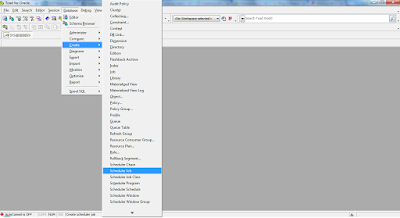
How to create a Simple Scheduler Job in Oracle Database using Toad
Image
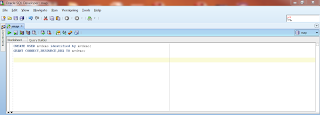
Scheduler is a process which runs programmed jobs at scheduled times. This process wakes up at the specified time and runs automatically. The basic elements of the scheduler are: Jobs Schedules Programs A job specifies what needs to be executed and when. A program is a collection of metadata that will be executed by the scheduler. It contains the name of the program (a procedure or an executable, the type of the program (pl/sql block, shell script etc). A schedule specifies when and how many times a job is executed. 1. Login to the database using Toad, and create a Scheduler Job as follows;
Oracle SOA Suite Clustered Environment on Oracle Enterprise Linux 6.4

Image
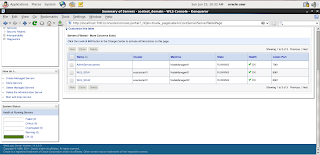
Recently, I have successfully prepared Oracle SOA clustered environment on Oracle Enterprise Linux 6.4 in production mode. This clustered environment includes Admin Server which is running on port 7001 and two SOA Managed Servers. Both SOA clustered Managed Servers are running on same port i.e. 8001. Node Managers are also configured for all domains. Summary of Servers in Weblogic console

Oracle Application Adatper 11.1.1.4.0 connectivity issue with Siebel 8.1.1.5

Solution:-  Change the Object Manager name to 'SCCObjMgr_enu' in Advanced tab in Oracle Application Explorer. Further details see my OTN forum post:- My Post on OTN Forum  

Insert Data into Oracle EBS through Interface tables by using Oracle SOA Suite Technology

Image
Adapter for Oracle Applications uses interface tables to insert and update data in Oracle Applications.  Interface Tables act as staging tables between client application and Apps Base tables. Data is never loaded directly into Oracle Applications base tables. Instead, data is first loaded into interface tables, and then Oracle-supplied concurrent programs move data from interface tables to base tables. This ensures that all business logic and processing is handled using Oracle components. Today I successfully loaded Sample Order Data from SOA Server to the following Oracle EBS Interface Tables:- 1) OE_HEADERS_IFACE_ALL 2) OE_LINES_IFACE_ALL BPEL Process of Insert Order into EBS

Use of DB Adapter in SOA Composite Application

Image
I successfully create SOA Composie Application that interact with Oracle Database by using DB Adapter. The Oracle Database Adapter enables a BPEL process to communicate with Oracle databases or third party databases through JDBC. The Oracle Database Adapter service is defined within a BPEL process partner link by using the Adapter Configuration Wizard of Oracle BPEL Process Manager. BPEL Process of my DB Adapter

Oracle WebCenter Content 11.1.1.7 and Portal 11.1.1.7

Image
Oracle just released the new version of WebCenter products stack, the WebCenter Centent 11gR1 (11.1.1.7) and WebCenter Portal 11gR1 (11.1.1.7). According to Oracle's official blog it includes many bug fixes in addition to enhancements to the WebCenter Content Application Extension Framework (AXF) supporting integrations with E-Business Suite and PeopleSoft.

Oracle Fusion Middleware Environment on Solaris 11

Image
Recently I prepared Oracle Fusion Middleware 11g environment for SOA Server Suite on Oracle Solaris11.1 (x86-64bit). This includes the installation and configuration of following Oracle products:- 1) Oracle Database 11gR2. 2) Repository creation for SOA Suite. 3) Oracle Weblogic Server 11g. 4) Oracle SOA Suite 11g. 5) Domain creation and configuration for Admin Server and SOA Server.

Configure and Install MVDEMO Sample Data Set in Oracle Databse XE 11g

Image
In this post we are going to configure and install MVDEMO Sample Data Set for Oracle MapViewer in Oracle Databse XE 11g on windows 7.   Pre-requisite for MVDEMO Sample Data Set   1) Oracle Java Development Kit (JDK 7). 2) Oracle Database Express Edition (XE 11g). 3) Oracle MapViewer QuickStart Kit 11g ps5. 4) Oracle SQL Developer 11g Installation Download MVDEMO Sample Data Set for MapViewer Demo from OTN. This Demo contains MapViewer sample data and instructions for use with Oracle Fusion Middleware Mapviewer 11g.

Create and Configure a Data Source in Weblogic Server for WebCenter Sites

Image
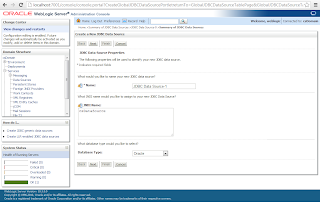
In this post we will craete and configure a Data Source in Weblogic Server for Oracle WebCenter installation. I assumes that the admin server has already start. Create the Data Source Log in to the WebLogic Server Administration Console. 1) In the tree at the left expand Services. 2) Click Data Sources. 3) Click New and select Generic Data Source 4. In the “Create a New JDBC Data Source” screen, enter the following values:     a. A name for the data source.     b. csDataSource for the JNDI name.

Create and configure Oracle Database 11g for WebCenter Sites 11g installation on Windows 7

Image
In this post we create and configure Oracle database 11g for WebCenter Sites installation on Windows 7. Create Oracle Database 11g Launch the Oracle Database Configuration Assistant from start menu --> All Program --> Configuration and Migration Tools In the Operations screen, select Create a Database and click Next

Prerequisites for Oracle WebCenter Sites 11g R1 (11.1.1.6.0) installation on Windows 7

Following are the pre-requisites for Oracle WebCenter Sites 11g R1 (11.1.1.6.0) installation on Windows 7 OS with Oracle Database.   Pre-requisites for Oracle WebCenter Sites 11g R1 (11.1.1.6.0) 1) Oracle JDK 1.7.0_07+ 2) Oracle Database 11.1.0.6+ 3) WebLogic Server 10.3.5+ and 10.3.6 ( Note: Fusion Middleware 11 g products are not supported on WebLogic Server 12.1.1)

How to verify WebCenter Portal 11gR1 (11.1.1.6.0) Installation

Image
Each domain has an adminServer which need to be started before we can start the managed servers and verfity the WebCenter Portal installation. This can be done by executing the startWebLogic.cmd command in following directory: <middleware home>\user_projects\domains\webcenter_domain\bin The admin server will now start. This can take a few minutes depending on your system.

How to Create a Weblogic Domain for Oracle Portal 11g R1 (11.1.1.6.0)

Image
In order to create a domain for Oracle Portal 11gR1, we need to run the configuration tool from Webcenter. This can be found in the commons directory of the WebCenter: [installation directory]\Middleware\Oracle_WC\common\bin Execute config.exe   From the Fusion Middleware Configuration Wizard chose Create a new Weblogic domain    

How to Install Oracle Webcenter Portal 11gR1 (11.1.1.6.0) on Windows 7

Image
In the previous post we have created required schemas for Oracle Webcenter Portal on Oracle Database 11gR2 through Repository Creation Utility (RCU). Now in this post we will continue the installation of Oracle Webcenter Portal 11gR1 on Windows 7 environment. What is Oracle Webcenter Portal 11g According to Oracle: WebCenter Portal is the modern user experience platform for the enterprise and the web. It consolidates the best user experience capabilities from a significant portfolio of leading portal products and related technologies to deliver a modern user experience for the enterprise.

How to disable 8dot3 Semantics Webcenter Content 11g Alert on Windows 7

Image
When you access the Webcenter  Content server through browser on window's system, you will get the alert  " The weblayout directory is on a filesystem with 8dot3 semantics. Legacy 16-bit 8dot3 filenames conflict with revision labels and will cause file loss. Disable 8dot3 semantics by running Installer DisableNtfs8dot3 and then restarting Windows "

Create a New Domain in Oracle Weblogic Server for Oracle Webcenter Contant 11g

Image
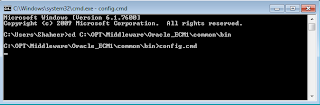
In this post we will see how to create a weblogic domain, it is a very important step that finaliz your configuration for Webcenter Contant Server run as a manage server in Weblogic. Here how we do it:- Domain Creation in Weblogic Server In the windows environment go to the [Middleware installation Path\Oracle_ECM1\common\bin]. In my case this is C:\OPT\Middleware\Oracle_ECM1\common\bin

How to Install Oracle Webcenter Content 11gR1 (11.1.1.6.0) on Windows 7

Image
In this port we will continue the installation of Oracle Webcenter Content 11gR1 known as Universal Content Management (UCM) on Windows 7 environment. The effectiveness and benefits of Webcenter Content are shown daily in the interest of customers and partners who choose to implement records management in their information systems. According to Oracle WebCenter Content  provides leading-edge solutions for all types of content management needs. From file server consolidation to sophisticated multisite web content management, Oracle WebCenter Content provides a robust, scalable solution, along with a powerful infrastructure that allows you to create content-enabled applications. Prerequisites for Webcenter Content 1) You need to install the database version 10.2.0.4.0 in 10g or version equal to higher than 11.1.0.7.0 2) Oracle Weblogic Server 11g

Create required Schemas for Oracle WebCenter Portal through RCU

Image
Repository Creation Utility is tool to create schema and load repository in existing database for Fusion Middleware components. Repository Creation Utility enables you to create and drop component schemas that are the part of Oracle fusion middleware.   Prerequisites for RCU You need to install the database version 10.2.0.4.0 in 10g or version equal to higher than 11.1.0.7.0 with the database character set AL32UTF8.   Download Link of RCU   You can download Repository Creation Utility 11.1.1.6.0 for Windows from the given below link   http://www.oracle.com/technetwork/middleware/downloads/fmw-11-download-092893.html

List of required Softwares for Oracle WebCenter Portal Installation

Following are the prerequites and recommended Softwares for Oracle WebCenter Portal 11g installation:-   1) Oracle Database 11 g Release 2 (11.2.0.1) 2) Oracle WebLogic Server 11 g R1 (10.3.6) 3) Repository Creation Utility (RCU) 11.1.1.6.0 4) Oracle WebCenter Content 11 g R1 (UCM) 11.1.1.6.0 5) Oracle WebCenter Portal 11 g ( 11.1.1.6.0)

Oracle Webcenter Developer

Recently I have joined Addvantum Innovative Technologies as Oracle WebCenter Developer. Oracle WebCenter is the user engagement platform for social business, delivering connectivity between people and information.  WebCenter Suite enables enterprises to improve customer loyalty with targeted websites, while enhancing productivity with contextual collaboration.  It increases business agility with intuitive portals, composite applications, and mash-ups, and offers seamless access to the right information in context.