Posts

Showing posts with the label UCM

Oracle WebCenter Content 11.1.1.7 and Portal 11.1.1.7

Image
Oracle just released the new version of WebCenter products stack, the WebCenter Centent 11gR1 (11.1.1.7) and WebCenter Portal 11gR1 (11.1.1.7). According to Oracle's official blog it includes many bug fixes in addition to enhancements to the WebCenter Content Application Extension Framework (AXF) supporting integrations with E-Business Suite and PeopleSoft.

How to Install Oracle Webcenter Portal 11gR1 (11.1.1.6.0) on Windows 7

Image
In the previous post we have created required schemas for Oracle Webcenter Portal on Oracle Database 11gR2 through Repository Creation Utility (RCU). Now in this post we will continue the installation of Oracle Webcenter Portal 11gR1 on Windows 7 environment. What is Oracle Webcenter Portal 11g According to Oracle: WebCenter Portal is the modern user experience platform for the enterprise and the web. It consolidates the best user experience capabilities from a significant portfolio of leading portal products and related technologies to deliver a modern user experience for the enterprise.

How to disable 8dot3 Semantics Webcenter Content 11g Alert on Windows 7

Image
When you access the Webcenter  Content server through browser on window's system, you will get the alert  " The weblayout directory is on a filesystem with 8dot3 semantics. Legacy 16-bit 8dot3 filenames conflict with revision labels and will cause file loss. Disable 8dot3 semantics by running Installer DisableNtfs8dot3 and then restarting Windows "

Create a New Domain in Oracle Weblogic Server for Oracle Webcenter Contant 11g

Image
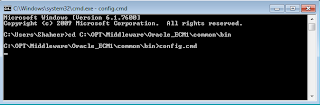
In this post we will see how to create a weblogic domain, it is a very important step that finaliz your configuration for Webcenter Contant Server run as a manage server in Weblogic. Here how we do it:- Domain Creation in Weblogic Server In the windows environment go to the [Middleware installation Path\Oracle_ECM1\common\bin]. In my case this is C:\OPT\Middleware\Oracle_ECM1\common\bin

How to Install Oracle Webcenter Content 11gR1 (11.1.1.6.0) on Windows 7

Image
In this port we will continue the installation of Oracle Webcenter Content 11gR1 known as Universal Content Management (UCM) on Windows 7 environment. The effectiveness and benefits of Webcenter Content are shown daily in the interest of customers and partners who choose to implement records management in their information systems. According to Oracle WebCenter Content  provides leading-edge solutions for all types of content management needs. From file server consolidation to sophisticated multisite web content management, Oracle WebCenter Content provides a robust, scalable solution, along with a powerful infrastructure that allows you to create content-enabled applications. Prerequisites for Webcenter Content 1) You need to install the database version 10.2.0.4.0 in 10g or version equal to higher than 11.1.0.7.0 2) Oracle Weblogic Server 11g

List of required Softwares for Oracle WebCenter Portal Installation

Following are the prerequites and recommended Softwares for Oracle WebCenter Portal 11g installation:-   1) Oracle Database 11 g Release 2 (11.2.0.1) 2) Oracle WebLogic Server 11 g R1 (10.3.6) 3) Repository Creation Utility (RCU) 11.1.1.6.0 4) Oracle WebCenter Content 11 g R1 (UCM) 11.1.1.6.0 5) Oracle WebCenter Portal 11 g ( 11.1.1.6.0)