Posts

Showing posts with the label Technologies

Insert Data into Oracle EBS through Interface tables by using Oracle SOA Suite Technology

Image
Adapter for Oracle Applications uses interface tables to insert and update data in Oracle Applications.  Interface Tables act as staging tables between client application and Apps Base tables. Data is never loaded directly into Oracle Applications base tables. Instead, data is first loaded into interface tables, and then Oracle-supplied concurrent programs move data from interface tables to base tables. This ensures that all business logic and processing is handled using Oracle components. Today I successfully loaded Sample Order Data from SOA Server to the following Oracle EBS Interface Tables:- 1) OE_HEADERS_IFACE_ALL 2) OE_LINES_IFACE_ALL BPEL Process of Insert Order into EBS

Oracle WebCenter Content 11.1.1.7 and Portal 11.1.1.7

Image
Oracle just released the new version of WebCenter products stack, the WebCenter Centent 11gR1 (11.1.1.7) and WebCenter Portal 11gR1 (11.1.1.7). According to Oracle's official blog it includes many bug fixes in addition to enhancements to the WebCenter Content Application Extension Framework (AXF) supporting integrations with E-Business Suite and PeopleSoft.

Oracle Fusion Middleware Environment on Solaris 11

Image
Recently I prepared Oracle Fusion Middleware 11g environment for SOA Server Suite on Oracle Solaris11.1 (x86-64bit). This includes the installation and configuration of following Oracle products:- 1) Oracle Database 11gR2. 2) Repository creation for SOA Suite. 3) Oracle Weblogic Server 11g. 4) Oracle SOA Suite 11g. 5) Domain creation and configuration for Admin Server and SOA Server.

How to Unlock HR Schema in Oracle Database XE 11gR2 by using PL/SQL Developer

Image
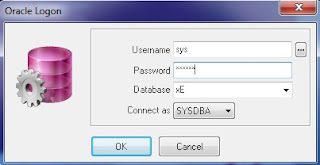
Oracle provides sample HR schema in all versions of its databases which is locked by default. For working with tutorial of Introduction to Oracle you need to work on HR schema. Follow the given below steps to unlock HR schema in Oracle Database XE 11gR2 by using PL/SQL Developer. Login in PL/SQL Developer as a user “system or sysdba” with respective password Click on New button and open Command Window

How to take Backup and Restore a Domain of Oracle GlassFish Application Server

Image
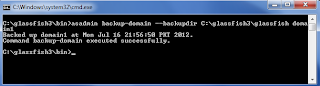
Backup Domain backup-domain  subcommand is used to take backup of domain. Before start the backup process, ensure that domain is stopped and then execute the following command. The  backup-domain  command operates only when the domain is stopped or suspended. # asadmin backup-domain --backupdir [directory patch] domainname --backupdir  switch is used to specify a directory in which to store the backup.

How to Deploy and Undeploy an Application in Oracle GlassFish Application Server

The easiest way of deploying an application through the command line is by using the following command: # asadmin deploy [ path of file ]/webapp1.war Access the webapp1  application by typing the following URL in your browser:

How to Delete Domain in Oracle GlassFish Application Server

Image
Deleting a domain is very simple in Oracle GlassFish Application Server. It can be accomplished by issuing the following command in the command line: # asadmin delete-domain domainname

How to Configure Multiple Domains in Oracle GlassFish Application Server

Image
If we want several domains to execute concurrently on the same server, then ports must be chosen carefully, as specifying the same ports for different services or even the same service across domains will prevent one of the domains form working properly. So to avoid port conflict you have to assign different port numbers in different domains for each purpose. The easy way of doing  this is using portbase option in create-domain command. Given below is the create domain command with portbase option. # asadmin create-domain --portbase [port number] domainname

List of Services for the domain in Oracle GlassFish Application Server

The default posts for the default domain are listed in the following table: Services Port Admin 4848 HTTP 8080 Java Messaging System (JMS) 7676       Internet Inter-ORB Protocal (IIOP) 3700 Secure HTTP (HTTPS) 8181 Secure IIOP 3820 Mutual Authorization IIOP 3920 Java Management Extensions (JMX) Administration 8686

How to Stop Oracle GlassFish Application Server Domain

Image
A domain that is executing can be stopped by issuing the following command: # asadmin stop-domain domainname

How to Start Oracle GlassFish Application Server Domain

Image
To start GlassFish, change the directory to [glassfish installation directory]/glassfishv3/bin on command prompt and execute the following command: # asadmin start-domain domainname I have configured domain1 as domain name and in my case above command change to:

How to create domains in Oracle GlassFish Application Server

Image
To create domain in GlassFish Server, open command prompt and change the directory to [glassfish installation directory]/glassfishv3/bin and execute the following command. The asadmin batch file is located in BIN folder that's way we change the directory location in command prompt. # asadmin create-domain domainname Change the domainname on your choice. Here I am creating a new domain called domain1 as shown below:

How to run Virtual OS in Full Screen mode by using Oracle VM VirtualBox

Image
Today I install the Oracle VM VirtualBox 4.1.18 on Windows 7 and in VM VirtualBox I install the Windows XP on it. After the installation I found a issue that I can't usefully run Virtualbox in full screen mode. I switched to full screen mode, but the full screen consisted of the window surrounded by black space as shown below.

Create Entity Object for Oracle ADF Components Layer in Application

Image
Lets look how we accutaly built Oracle ADF Components layer for our application. The first step is usually creating Entity Objects and this involves following steps. 1) Mapping to database tables 2) Choosing specific attributes 3) Set attribute properties Start Oracle JDeveloper, Click on New Application and from Categories select Application and from Item select Fusion Web Application (ADF)

Top 20 Oracle Most Popular Technology Articles of 2011

Java Can Excel at Painless Parallel Programming Too Taking Your First Steps with Oracle Solaris 11 Contexts and Dependency Injection in Java EE 6 Unit Testing for Java EE Neural Networks on the NetBeans Platform Oracle Senior VP Steve Harris on Oracle’s Vision of Java Oracle Database 11g Express Edition Quick Tour Looking Ahead to Java SE 7 and 8: A Discussion with Oracle’s Java Language Architect Working with Java SE 7 Exception Changes Client-Side Improvements in Java 6 and Java 7 How I Simplified Oracle Database Installation on Oracle Linux The DBA’s Guide to Setting Up Oracle RAC One Node and Oracle Data Guard Integration Testing for Java EE Build a .NET Application on the Oracle Database with Microsoft Visual Studio 2010 Templating with JSF 2.0 Facelets Using Adobe Flex and JavaFX with JavaServer Faces 2.0 Series: Oracle Exadata Command Reference Better Resource Management with Java SE 7: Beyond Syntactic Sugar Using Transitions for Animati...

Oracle Solaris 11 releases with new features

Image
Oracle Solaris 11 will be officially released today, including the Sparc platform compatible with x86. Oracle Solaris 11 is SPARC SuperCluster T4-4 Integrated Systems and Oracle SPARC T4 server product line operating system, its also supports Oracle Exadata Database cloud server X2-2, X2-8 system, middleware and Oracle Exalogic cloud server.

Oracle Express Edition XE-11gr2 Screen Shorts

Image
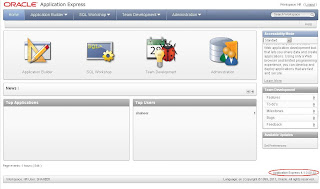
Home Page Information Storage Information

About Oracle APEX 4.1

Image
Oracle Apex 4.1 version is now available on otn.oracle.com for download. There are two types of version available for download, Oracle Application Express 4.1 for All Languages download size is 950MB and Oracle Application Express 4.1 for English Language Only download size is 300MB. Documentation and Tutorials are also on both PDF and HTML versions on otn.oracle.com.

Comparison between Oracle SPARC T4 and IBM P7

Image
Oracle Parallel Everything vs. IBM’s Fast CPU Core SPARC T4 Faster than P7 for JAVA – P7 Faster for Integer Arithmetic

Red Flag Asianux 4 Server

Image
Asia's largest open source software vendor Red Flag is launching a new version of Server Operating System Asianux 4. Asianux 4 is based on open framework, continue into the cloud computing and virtualization technologies that is used to develop a series of cloud computing products and solutions.