Posts

Showing posts with the label OEL

Oracle SOA Suite Clustered Environment on Oracle Enterprise Linux 6.4

Image
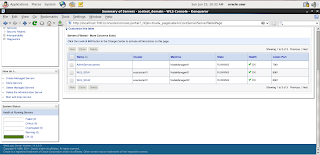
Recently, I have successfully prepared Oracle SOA clustered environment on Oracle Enterprise Linux 6.4 in production mode. This clustered environment includes Admin Server which is running on port 7001 and two SOA Managed Servers. Both SOA clustered Managed Servers are running on same port i.e. 8001. Node Managers are also configured for all domains. Summary of Servers in Weblogic console

Oracle Enterprise Linux 6.3 KDE

Image
Today I installed Oracle Enterprise Linux 6.3 with KDE and it remembers me the SUSE Linux Enterprise Server. I found OEL 6.3 KDE is very similar to SLES 11 KDE and here I am poisting some snapshorts of Oracle Enterprise Linux 6.3. OEL 6.3 Login Screen

View Linux Directory Free Space Commands

Image
df-hl view the disk space left df-h view of the partition size for each root path  du-sh [directory name] returns the size of the directory du-sm [folder] to return to the folder number of the total Mv

Oracle Enterprise Linux Wallpapers

Image
Oracle Enterprise Linux Wallpapers

Linux Miscellaneous but important commands

To find help on some topic : [root@SLES /]# man pwd or [root@SLES /]# info pwd Also you can seek for a particual keyword ( say:  umask) in the man pages by: [root@SLES /]# man -K umask To find a file in the /usr directory, use: [root@SLES /]# find /usr -name “*.doc” To find files and directories owned by the group students in the /usr directory, use: [root@SLES /]# find /usr -group students Assuming a user left the organization and the files owned by his account name must be found and deleted for security reasons, use : [root@SLES /]# find / -user Shaheer -exec rm  '{}'  ';' Want to perform some quick mathematical calculations, use: [root@SLES /]# bc To set up date and time as 16 Jan 2000 17:35 you should use: [root@SLES /]# date 0520173503 To synchronize it with the hardware clock, use: [root@SLES /]# hwclock –-systohc To check for memory and swap space usage, you can use: [root@SLES /]# free or [root@SLES /]# top To check the sy...
Reset the Linux Root User Password, If you forget the password

Image
With Screen Shots: Follow these steps to reset the password when using GRUB 1)  Reboot the system, and when you are at the selection prompt, highlight the line of Enterprise Linux and press ' e ' from keyboard. 2)  This will take you to another screen where you should select the entry that begins with ' kernel /boot/vmlinuz-2.6.18-164.el5 ro root=LABLE=/ rhgb quiet' and press ' e ' again. 3 )  Append ' single' to the end of that line (without the quotes). Make sure that there is a space between what's there and ' single ' and press enter. If your system requires you to enter your root password to log into single-user mode, then append init=/bin/bash after 'single'. Hit 'Enter' to save the changes. 4)  Press 'b' to boot into Single User Mode. 5)  Once the system finishes booting, you will be logged in as root. Use passwd and choose a new password for root. 6)  Type reboot to reboot the system, and yo...

Oracle Database 11gR2 Grid Infrastructure and Automatic Storage Management for a Standalone Server (Part-2)

Image
Installation of Oracle 11gR2 Database Software Step 1 Login into system from Oracle user Run Oracle 11gR2 Database installer Step 2 Select Install Database Software only Step 3 In node Selection option select Single Instance database installation. Step 4 Select Product Language Step 5 Select Database Edition Step 6 Environment variables are already set Step 7 User groups Step 8 Summary Step 9 Donot run ROOT.SH script through root user just press OK to finish the installation. Because environment variablehave already been modified during the execution of Grid Infrastructure "root.sh" script. Step 10 Installation finished successfully. Step 11 Create database through Database Configuration Assistant (DBCA) Step 12 Select the Storage Type (ASM) and Database Area (+DATA) Finish to create the Database

Oracle Database 11gR2 Grid Infrastructure and Automatic Storage Management for a Standalone Server (Part-1)

Image
I have successfully Installed Oracle 11gR2 Grid Infrastructure and Automatic Storage Management for a Standalone Server on Oracle Enterprise Linux 5.4. I mostly use SUSE Enterprise Linux because of YAST tool but Oracle ACFS/ADVM is not supported on SUSE Linux. Oracle Automatic Storage Management Cluster File System and Oracle Automatic Storage Management Dynamic Volume Manager (ACFS/ADVM) are supported only on Oracle Enterprise Linux 5 and Red Hat Enterprise Linux 5 for Linux x86 and Linux x86-64. Maybe ACFS/ADVM support on SUSE Linux patches or documents are available on Oracle Metalink. That’s way I chose OEL 5.4 for Grid Infrastructure Installation. Requirements for Oracle Grid Infrastructure Installation 1) Memory Requirement At least 1 GB of RAM 2) Disk Space Requirement At least 3 GB of disk space At least 1 GB of disk space in the /tmp directory 3) Software Requirement Linux_11gR2_grid 4) ASMLib Software Requirement oracleasm-support-2.1.3-1.el5.i386.rp...