Posts

Showing posts with the label Database Administration

Create and configure Oracle Database 11g for WebCenter Sites 11g installation on Windows 7

Image
In this post we create and configure Oracle database 11g for WebCenter Sites installation on Windows 7. Create Oracle Database 11g Launch the Oracle Database Configuration Assistant from start menu --> All Program --> Configuration and Migration Tools In the Operations screen, select Create a Database and click Next
How to Unlock HR Schema in Oracle Database XE 11gR2 by using PL/SQL Developer

Image
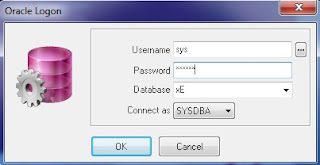
Oracle provides sample HR schema in all versions of its databases which is locked by default. For working with tutorial of Introduction to Oracle you need to work on HR schema. Follow the given below steps to unlock HR schema in Oracle Database XE 11gR2 by using PL/SQL Developer. Login in PL/SQL Developer as a user “system or sysdba” with respective password Click on New button and open Command Window

How to Create Packages in Oracle Database using TOAD for Oracle

Image
What are Packages in Oracle Database A package is a group of procedures, functions, variables and SQL statements created as a single unit. It is used to store together related objects. A package has two parts, Package Specification and Package Body. Package Specification Package Specification acts as an interface to the package. Declaration of types, variables, constants, exceptions, cursors and subprograms is done in Package specifications. Package specification does not contain any code. Package Body Package body is used to provide implementation for the subprograms, queries for the cursors declared in the package specification.

How to create Oracle stored Procedures using TOAD for Oracle

Image
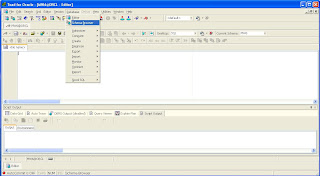
In a database management system, a stored procedure is a set of Structured Query Language (SQL) statements with an assigned name that's stored in the database in compiled form so that it can be shared by a number of programs. The use of stored procedures can be helpful in controlling access to data, preserving data integrity and improving productivity. The Oracle PL/SQL language allows you to write procedure to centralize the business logic and store the code in the database. I have created the following Stored Procedure on Oracle using TOAD. This particular Stored Procedure will Insert a Customer to the Customer Table. For the sake of simplicity, Customer Table contains only 4 columns (Customer ID, Customer Name, City and Contact No). In this post I will show you how to create Oracle stored Procedure using TOAD.  Connect to Oracle Database using TOAD. Click on Database menu and open Schema Browser.

How to create Oracle stored Functions using TOAD for Oracle

Image
The Oracle PL/SQL language allows you to write functions and procedure to centralize the business logic and store the code in the database.  A stored function is similar to a stored procedure with one key difference, a stored function returns a single value. This makes a stored function available in your SQL SELECT statements, unlike stored procedures that you must call within an anonymous PL/SQL block or another stored procedure. In this post I will show you how to create Oracle stored Functions using TOAD.  Connect to Oracle Database using TOAD. Click on Database menu and open Schema Browser.

How to Create Synonyms in Oracle using TOAD for Oracle

Image
A synonym is a database object that provides a better name to refer to objects. You can use synonyms to  shorten lengthy names or to ease the reference to an object owned by another user. You can create  synonyms for a table, view, sequence, procedure and other objects. In this post I will show you how to create Synonyms in Oracle Database using TOAD for Oracle. Connect to Oracle Database using TOAD. Click on Database menu and open Schema Browser

Set the Urdu Supported Character Set in Oracle Database

Image
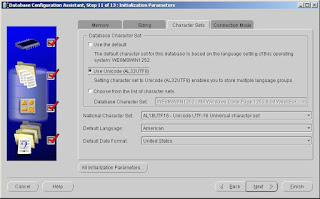
Last week my Team Lead gave me the task to Store Urdu in Oracle Database (for sending SMS). For this purpose I have created a database through Database Configuration Assistant (dbca) and on Initialization Parameters step picked the Use Unicode (AL32UTF8). Setting character set to Unicode (AL32UTF8) enables you to store multiple language groups. Set the National Character Set AL16UFT16-Unicode UTF-16 Universal Character Set as shown below. After database creation set the NLS_LANG parameter of Oracle Database on Window’s Registry as shown below. Data value should be AMERICAN_AMERICAN.AL32UTF8. After this restart the Services of Oracle Database and TNS Listener. To verify the NLS Database Parameters execute the following query. select * from nls_database_parameters where parameter = any('NLS_CHARACTERSET','NLS_NCHAR_CHARACTERSET'); To store the Urdu character sets I set the column datatype NVARCHAR and completed the first face of my project task succes...

Which perform faster in Oracle Database IN or EXISTS

EXISTS  is always perform faster in Oracle Database because “ EXISTS ” returns a boolean value (True or False), whereas “ IN ” returns a value.

What is the difference between truncate and delete in Oracle Database

TRUNCATE is much faster than delete because it does not allow for rollbacks to occur, and automatically commits data when finishes.Also truncate does not fire any trigger, so if there is a trigger on your table, TRUNCATE would not fire it but DELETE will and you cannot use the WHERE clause on TRUNCATE.

Pass Oracle Database 11g - SQL Fundamentals-I Exam

Image
On Friday 08-April-2011, I passed the 1st paper of Oracle Certificate Associate track i.e. Oracle Database 11g - SQL Fundamentals-I with 94% marks. Yaahoo Now i am preparing Next Exam to become Oracle PL/SQL Developer Certified Associate.

Oracle User Creation and Management

Image
1) As a competent DBA, before creating a new user to check the following items: * Determine the object must be stored in the user table space; * Determine the quota for each table space; * Give the user the default table space and temporary table space; * Create a user; * The user system privileges and roles required to give users; 2) The following example creates a user:     create user infotech - -to create a user name for the infotech;     identified by infotech -- the user's password is infotech;     default tablespace APEX_SPACE -- the user's default table space is APEX_SPACE;     temporary tablespace temp --the user temporary table space is pioneer_temp;     quota 30m on APEX_SPACE --the user to use up to 30M in APEX_SPACE space;     quota 30m on users --the user in the users table space to use up to 30M of space;     password expire --the first time the user l...

Creating Views in Oracle Database Using TOAD

Image
A view logically represents subsets of data from one or more tables. You can restrict a user’s access to data in a table by using views. A view does not have a structure of its own and is stored as a SELECT statement in the database. Views are of two types, simple and complex: • Simple view: Retrieves data from only one table and contains no functions or group data. You can  perform DML operations through a simple view. • Complex view: Retrieves data from multiple tables or contains functions or group data. A complex  view does not always allow you to perform DML operations. Creating Simple View You create a simple view based on only one table. In other words, the SELECT statement of the view  retrieves data from only one table. For example:- CREATE OR REPLACE VIEW EMP_VU (EMPNO, EMP_NAME, ANNUAL_SALARY, DEPTNO) AS SELECT e.EMPNO, e.EMP_NAME, e.SALARY*12, e.DEPTNO FROM employee e; Write the SQL script in SQL tab and press F5 to execute. ...

Create Tables in Oracle Database using TOAD

Image
In this tutorial I am sharing how to create a table in Oracle Database  using TOAD for Oracle Software. A table is a database object created by users to store data in the form of rows and columns. A table is the basic unit of storage. Table can be created at any time, even while users are accessing the database. A database table consists of column that needs to be defined when creating the table. Table can have up to 1,000 columns. A table must conform to some standard database object-naming conventions. Follow the given below steps to create table in Oracle Database using TOAD software.

Common Questions of Oracle DBA asked during interview

1. Explain the $ ORACLE_HOME and $ ORACLE_BASE the difference? Answer: ORACLE_BASE is the root directory of oracle, ORACLE_HOME is the oracle product directory. 2. How to increase buffer cache hit rate? Answer: more busy in the database, the application buffer cache advisory tool, query v $ db_cache_advice. If necessary changes, you can use the command alter system set db_cache_size. 3. How to generate explain plan? Answer: Run utlxplan.sql. Create plan table for specific SQL statement, using the explain plan set statement_id = 'tst1' into plan_table run utlxplp.sql or utlxpls.sql View explain plan. 4. Which column can be used to distinguish the V $ views, and GV $ views? Answer: INST_ID indicate a specific cluster environment instance. 5. Gives the database starts normally experienced several states? Answer: STARTUP NOMOUNT - database instance startup. STARTUP MOUNT - Database mounted. STARTUP OPEN - database open. 6. How to create a backup control file? Answer: A...

How to Show Used/Free Tablespace Space in Oracle DB

Image
This script will list tablespace wise free space and used space (also total size) as well as total space. For running this query you must have SELECT privileges to SYS.DBA_FREE_SPACE, SYS.V_$DATAFILE, SYS.V_$TABLESPACE views. SELECT Total.name "Tablespace Name",        nvl(Free_space, 0) "Free Size(MB)",        nvl(total_space-Free_space, 0) "Used Size(MB)",         total_space "Total Size(MB)" FROM   (select tablespace_name, sum(bytes/1024/1024) free_space      from sys.dba_free_space     group by tablespace_name   ) Free,   (select b.name,  sum(bytes/1024/1024) total_space      from sys.v_$datafile a, sys.v_$tablespace B     where a.ts# = b.ts#     group by b.name   ) Total WHERE Free.Tablespace_name(+) = Total.name ORDER BY Total.name;

Show Used/Free Space Datafile wise in Oracle DB

Image
T his script will list datafile wise Allocated size, Used Size and Free Size. For running this query you must have SELECT privileges to V$DATAFILE and DBA_FREE_SPACE views. SELECT   SUBSTR (df.NAME, 1, 40) file_name, df.bytes / 1024 / 1024 "Allocated Size(MB)",          ((df.bytes / 1024 / 1024) - NVL (SUM (dfs.bytes) / 1024 / 1024, 0)) "Used Size (MB)",          NVL (SUM (dfs.bytes) / 1024 / 1024, 0) "Free Size(MB)"     FROM v$datafile df, dba_free_space dfs    WHERE df.file# = dfs.file_id(+) GROUP BY dfs.file_id, df.NAME, df.file#, df.bytes ORDER BY file_name;

Find the Overall DB Size in oracle Database

Image
The biggest portion of a database's size comes from the datafiles. To find out how many megabytes are allocated to all datafiles the query is given below. My Database is new and i have few tables in it that's way the size is too small: select sum(bytes)/1024/1024 "Megabiytes" from dba_data_files; To get the size of all TEMP files: select nvl(sum(bytes),0)/1024/1024 "Megabiytes" from dba_temp_files; To get the size of the on-line redo-logs: select sum(bytes)/1024/1024 "Megabiytes" from sys.v_$log; Putting it all together into a single query: select a.data_size+b.temp_size+c.redo_size "total_size" from ( select sum(bytes) data_size from dba_data_files ) a, ( select nvl(sum(bytes),0) temp_size from dba_temp_files ) b, ( select sum(bytes) redo_size from sys.v_$log ) c /

Monitoring DML Operations on the Tables

Image
The Oracle feature Monitor, monitors the DML operations INSERT / UPDATE / DELETE and TRUNCATE on the tables. Table monitoring can be implemented on a table by executing the following statement:- "ALTER table TABLE_NAME MONITORING". Once monitor option is enable for a table, all DML operations on it are register in a view ( sys.DBA_TAB_MODIFICATIONS) based on sys.mon_mods$ table. The DML counters from this view represent the number of DML operations since the last gather statistics. The overhead on performance is not to be considerable since this mechanism work on memory and flush changes to DBA_TAB_MODOFICATIONS view periodically. In 9i, tables should be implemented with monitoring by executing "alter table table_name monitoring", but in 10g monitor is enabled by default. The advantage of this feature is when gathering statistics. Based on the dba_tab_modifications view we can gather statistics for only tables that have more than X% changes (compared to num...