Posts

Showing posts with the label Open Source

How to take Backup and Restore a Domain of Oracle GlassFish Application Server
Image
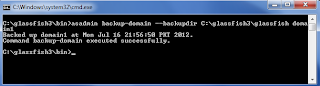
Backup Domain backup-domain  subcommand is used to take backup of domain. Before start the backup process, ensure that domain is stopped and then execute the following command. The  backup-domain  command operates only when the domain is stopped or suspended. # asadmin backup-domain --backupdir [directory patch] domainname --backupdir  switch is used to specify a directory in which to store the backup.

How to Deploy and Undeploy an Application in Oracle GlassFish Application Server

The easiest way of deploying an application through the command line is by using the following command: # asadmin deploy [ path of file ]/webapp1.war Access the webapp1  application by typing the following URL in your browser:

How to Delete Domain in Oracle GlassFish Application Server

Image
Deleting a domain is very simple in Oracle GlassFish Application Server. It can be accomplished by issuing the following command in the command line: # asadmin delete-domain domainname

How to Configure Multiple Domains in Oracle GlassFish Application Server

Image
If we want several domains to execute concurrently on the same server, then ports must be chosen carefully, as specifying the same ports for different services or even the same service across domains will prevent one of the domains form working properly. So to avoid port conflict you have to assign different port numbers in different domains for each purpose. The easy way of doing  this is using portbase option in create-domain command. Given below is the create domain command with portbase option. # asadmin create-domain --portbase [port number] domainname

List of Services for the domain in Oracle GlassFish Application Server

The default posts for the default domain are listed in the following table: Services Port Admin 4848 HTTP 8080 Java Messaging System (JMS) 7676       Internet Inter-ORB Protocal (IIOP) 3700 Secure HTTP (HTTPS) 8181 Secure IIOP 3820 Mutual Authorization IIOP 3920 Java Management Extensions (JMX) Administration 8686

How to Stop Oracle GlassFish Application Server Domain

Image
A domain that is executing can be stopped by issuing the following command: # asadmin stop-domain domainname

How to Start Oracle GlassFish Application Server Domain

Image
To start GlassFish, change the directory to [glassfish installation directory]/glassfishv3/bin on command prompt and execute the following command: # asadmin start-domain domainname I have configured domain1 as domain name and in my case above command change to:

How to create domains in Oracle GlassFish Application Server

Image
To create domain in GlassFish Server, open command prompt and change the directory to [glassfish installation directory]/glassfishv3/bin and execute the following command. The asadmin batch file is located in BIN folder that's way we change the directory location in command prompt. # asadmin create-domain domainname Change the domainname on your choice. Here I am creating a new domain called domain1 as shown below:

How to run Virtual OS in Full Screen mode by using Oracle VM VirtualBox

Image
Today I install the Oracle VM VirtualBox 4.1.18 on Windows 7 and in VM VirtualBox I install the Windows XP on it. After the installation I found a issue that I can't usefully run Virtualbox in full screen mode. I switched to full screen mode, but the full screen consisted of the window surrounded by black space as shown below.

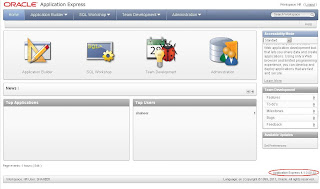
Oracle Express Edition XE-11gr2 Screen Shorts

Image
Home Page Information Storage Information

About Oracle APEX 4.1

Image
Oracle Apex 4.1 version is now available on otn.oracle.com for download. There are two types of version available for download, Oracle Application Express 4.1 for All Languages download size is 950MB and Oracle Application Express 4.1 for English Language Only download size is 300MB. Documentation and Tutorials are also on both PDF and HTML versions on otn.oracle.com.

Red Flag Asianux 4 Server

Image
Asia's largest open source software vendor Red Flag is launching a new version of Server Operating System Asianux 4. Asianux 4 is based on open framework, continue into the cloud computing and virtualization technologies that is used to develop a series of cloud computing products and solutions.

Best Desktop Linux Distribution

Image
In the past few year Ubuntu occupy the top position in the Linux Desktop Distribution. But after the release of Fedora 15 it come out on top spot in the Linux Desktop Distribution in 2011. Some features of Fedora 15 are given below.

Free - Open Source Version Control Software Systems

Image
Subversion is an open source version control system. Founded in 2000 by CollabNet, Inc. Subversion universally recognized and adopted as an open-source, centralized version control system characterized by its reliability as a safe haven for valuable data. The simplicity of its model and usage and its ability to support the needs of a wide variety of users and projects, from individuals to large-scale enterprise operations. Git is an open source distributed version control system for effective, high-speed processing from very small to very large project version management. Darcs is a free, open source source code management system. Darcs is easy to learn and efficient to use because it asks you questions in response to simple commands, giving you choices in your work flow. You can choose to record one change in a file, while ignoring another. As you update from upstream, you can review each patch name, even the full "diff" for interesting patches. Bazaar is a d...

View Linux Directory Free Space Commands

Image
df-hl view the disk space left df-h view of the partition size for each root path  du-sh [directory name] returns the size of the directory du-sm [folder] to return to the folder number of the total Mv

openSUSE Linux 11.4 Released with Downloads

Image
openSUSE Linux 11.4 has been released with downloads Links. openSUSE Linux 11.4 Main Goals. Make openSUSE the easiest for anyone to become available and the most widely used Linux distributions. Joint use of open source software to make openSUSE the world's most available Linux distributions and Linux newbies and experienced users of the desktop environment. Significantly simplify and open up its development and packaging processes to make openSUSE a provider of Linux developers and software platform of choice.  Release Notes: http://news.opensuse.org/2011/03/10/opensuse-11-4/ http://download.opensuse.org/distribution/11.4/iso/openSUSE-11.4-KDE-LiveCD-i686.iso http://download.opensuse.org/distribution/11.4/iso/openSUSE-11.4-GNOME-LiveCD-i686.iso http://download.opensuse.org/distribution/11.4/iso/openSUSE-11.4-KDE-LiveCD-x86_64.iso http://download.opensuse.org/distribution/11.4/iso/openSUSE-11.4-GNOME-LiveCD-x86_64.iso

Top 7 Open Source Linux Distribution in 2011

Image
1) Ubuntu Linux 2) Mandriva Linux 3) PCLinuxOS   4) Gentoo Linux 5) openSUSE Linux   6) Debian 7) FreeBSD

Linux Miscellaneous but important commands

To find help on some topic : [root@SLES /]# man pwd or [root@SLES /]# info pwd Also you can seek for a particual keyword ( say:  umask) in the man pages by: [root@SLES /]# man -K umask To find a file in the /usr directory, use: [root@SLES /]# find /usr -name “*.doc” To find files and directories owned by the group students in the /usr directory, use: [root@SLES /]# find /usr -group students Assuming a user left the organization and the files owned by his account name must be found and deleted for security reasons, use : [root@SLES /]# find / -user Shaheer -exec rm  '{}'  ';' Want to perform some quick mathematical calculations, use: [root@SLES /]# bc To set up date and time as 16 Jan 2000 17:35 you should use: [root@SLES /]# date 0520173503 To synchronize it with the hardware clock, use: [root@SLES /]# hwclock –-systohc To check for memory and swap space usage, you can use: [root@SLES /]# free or [root@SLES /]# top To check the sy...

Open Source Tools for Linux Servers Management / Configuration

Image
Cobbler Cobbler can be used to quickly build Linux network installation environment, it has the technical threshold of Linux network installation, from the junior college level or above, the success down to middle school or below, even the cobbler can learn. openQRM openQRM plug-ins provide an open management structure, you can easily to existing data center applications integrated into one, such as Nagios and VMware. openQRM data center operations automation can not only help you improve availability, but also can reduce your enterprise data center management costs.  Spacewalk Spacewalk is a Linux and Solaris systems management solution that’s allow you to, Inventory your systems (hardware and software information), Install and update software on your systems, Collect and distribute your custom software packages into manageable groups, Provision (kickstart) your systems, Manage and deploy configuration files to your systems, Monitor your systems, Provision and ...

Free Virtual Machines for Linux Operating System

Image
Vmware Player Vmware player is a PC to run multiple operating systems simultaneously on the most simple method, with its friendly user interface, Vmware player so that everyone has the courage to try Windows 7, Chrome OS and the latest Linux, or create isolated virtual machines in new product testing and safety online.   To install VMware player VMware web site you have to register an account and then to find your registration email activation message, click the activation link to activate your profile, so you can download the VMware player, 32-bit and 64-bit versions of Windows and Linux. VMware player graphical interface designed to be very good, it provides the option is also very easy to understand. Some Features of Vmware Player   Windows and Linux on a consistent management interface VM snapshot is available 32-bit and 64-bit virtual machine A single virtual machine can support up to 8 CPU With 3D graphics acceleration option Closed source In http://www.vmwar...