Posts

Showing posts with the label Tips

How to create Oracle stored Procedures using TOAD for Oracle

Image
In a database management system, a stored procedure is a set of Structured Query Language (SQL) statements with an assigned name that's stored in the database in compiled form so that it can be shared by a number of programs. The use of stored procedures can be helpful in controlling access to data, preserving data integrity and improving productivity. The Oracle PL/SQL language allows you to write procedure to centralize the business logic and store the code in the database. I have created the following Stored Procedure on Oracle using TOAD. This particular Stored Procedure will Insert a Customer to the Customer Table. For the sake of simplicity, Customer Table contains only 4 columns (Customer ID, Customer Name, City and Contact No). In this post I will show you how to create Oracle stored Procedure using TOAD.  Connect to Oracle Database using TOAD. Click on Database menu and open Schema Browser.

How to run Virtual OS in Full Screen mode by using Oracle VM VirtualBox

Image
Today I install the Oracle VM VirtualBox 4.1.18 on Windows 7 and in VM VirtualBox I install the Windows XP on it. After the installation I found a issue that I can't usefully run Virtualbox in full screen mode. I switched to full screen mode, but the full screen consisted of the window surrounded by black space as shown below.

Perform Field Level Validation in Oracle ADF

Image
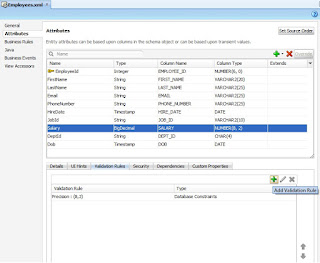
We can also define the field level validation at Entity Object Level. The purpose of validation is to validate data before sent to the database. Declarative validation involves following steps:- 1) Add validation 2) Define Validation 3) Set Error Message In this post we will continue the previous post example and perform validation on Salary Field. Open the employee entity from model.eo package. From attribute select Salary field, open the Validation Rule tab and click plus sign to Add the Validation.

List of Java Language Reserved Keywords

Here is a list of keywords in the java language. These words are reserved you cannot use any of these words as names in your programs. abstract continue for new switch boolean default package synchronized break do if private this double implements protected throw byte else import public throws case enum assert instanceof return transient catch extends int short try char final interface static void class finally long strictfp volatile float native super while

Tools for inserting Unicode Urdu Data into Oracle Database

Image
Following tools are used to insert Unicode Urdu Data into Oracle Database without any configuration or setting. 1) Oracle iSQL*Plus 2) Oracle SQL Developer Oracle iSQL*Plus iSQLPlus (iSQL*Plus) is a web-based utility similar to SQL*Plus. Using iSQL*Plus you can run SQL and PL/SQL commands and display their results. iSQLPlus commonly used by users, administrators, and programmers. How to access Oracle iSQL*Plus Use the following command to start the services of Oracle iSQL*Plus. Isqlplusctl start Open your web browser and navigate to the system (http://your.system.name:5560/isqlplus) . Oracle iSQL*Plus used the 5560 port. Oracle SQL Developer Oracle SQL Developer is an integrated development environment (IDE) for working with SQL in Oracle databases. Oracle Corporation provides this product free. You can use this IDE to insert Unicode Urdu data in Oracle Database without any NLS LANG setting.

Set the Urdu Supported Character Set in Oracle Database

Image
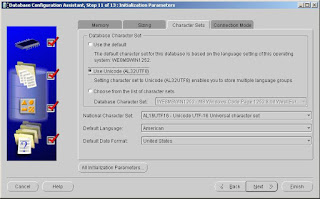
Last week my Team Lead gave me the task to Store Urdu in Oracle Database (for sending SMS). For this purpose I have created a database through Database Configuration Assistant (dbca) and on Initialization Parameters step picked the Use Unicode (AL32UTF8). Setting character set to Unicode (AL32UTF8) enables you to store multiple language groups. Set the National Character Set AL16UFT16-Unicode UTF-16 Universal Character Set as shown below. After database creation set the NLS_LANG parameter of Oracle Database on Window’s Registry as shown below. Data value should be AMERICAN_AMERICAN.AL32UTF8. After this restart the Services of Oracle Database and TNS Listener. To verify the NLS Database Parameters execute the following query. select * from nls_database_parameters where parameter = any('NLS_CHARACTERSET','NLS_NCHAR_CHARACTERSET'); To store the Urdu character sets I set the column datatype NVARCHAR and completed the first face of my project task succes...

How to Identify Oracle Production Exam and Beta Exam

Oracle Certification Beta Exam begins with ‘1Z1’ and Oracle Certification Production Exam begins with ‘1Z0’. Both versions of the exam have the same suffix. For example, a beta version of Oracle Fusion Middleware 11g Build Applications exam is 1Z1-151 and the production version of this exam will be 1Z0-151.

How to Fix Database Column Alias name problem in Microsoft Excel

Image
Database Column Alias name caused the query to fail problem when try to Microsoft Query to return data from some third-party database into Microsoft Excel. The error message that you receive depends on the data source that you use. I am using Oracle Database 10g and because the use of column alias name Microsoft Query generate ‘ORA-00923: FROM keyword not found where expected’ error. A supported hotfix is available from Microsoft and this hotfix is prebuilt in Microsoft Excel 2007. In the following steps I will show you how to enable hotfix for Excel 2007. 1) Exit all office programs 2) Click start, and then click run 3) In the open box, type regedit and then click ok 4) Locate, and then click to select the following registry subkey: HEKY_CURRENT_USER\Software\Microsoft\Office\12.0\query\options 5) After you select the subkey that is specified in step 4, point to New on the Edit menu, and then click DWORD value. 6) Type AllowAlias, and then press ENTER. 7) Reghit-click AllowAl...

How to fetch Data from Oracle Database to Microsoft Excel

Image
Recently my Team Lead gave me the task to fetching the data from Oracle Database in Microsoft Excel through Microsoft Query. After spending some time in R&D I was successfully completed this task and now I am sharing my knowledge and steps to fetch data from Oracle Database to Microsoft Excel. 1) From the Data tab in MS Excel, click From Other Source icon 2) From Choose Data Source window Select New Data Source and click OK 3) From Create New Data Source window give the Data Source Name and select Microsoft ODBC for Oracle as Driver from the list. 4) Enter Databse User Name, Password and Server 5) Select Oracle Databsae tables and its Columns from Query Wizard-Choose Columns 6) Filter the data to specify which rows to include in your query. 7) Specify how you want your data sorted. 8) Select Retrun data to Microsoft Office Excel 9) From Import Data window - Select how you want to view this data in your workbook 10) Extracted Data

Database One to One Relationship with example

Image
In most database designs, if you have a One to One relationship, there is most likely something wrong with your database design. It should be very exceptional to have One to One relationship. In general this would point out that your two entities with the one to one relationship should be combined into one single entity. Example: In Pakistan a person can have only one ID Card. Also, a sp ecific ID card can belong to only one person. Let’s look at the Person and ID Document example: In the Person table, the column Person ID will be the Primary Key. In the ID Document table, the ID Number will be the Primary key.

Use of APPDAYPK library in Oracle Forms

Image
The APPDAYPK library contains the packages that control the Oracle Applications Calendar feature. The calendar (or the date picker) is a utility that oracle application provide to pick the dates for a date type field. Image of Oracle Application Calender

List of Triggers in Oracle Report Developer

There are five types of triggers in Oracle Report Developer 1) Before report trigger 2) After report trigger 3) Before Parameter trigger 4) After parameter trigger 5) Between pages trigger

Which perform faster in Oracle Database IN or EXISTS

EXISTS  is always perform faster in Oracle Database because “ EXISTS ” returns a boolean value (True or False), whereas “ IN ” returns a value.

How many LONG columns are allowed in a table in Oracle Database

Restriction for the use of LONG columns in Oracle Databsae 1) Only one column of type LONG is allowed.

What is the difference between CLOB and BFile in Oracle Database

The Oracle BFile type, is used to store unstructured binary data outside of the database in the operating system. BFiles are read-only and only support random-reads. CLOB type is stored in the database using two byte code character set. Unlike BFile, CLOB support sequential access and can be modified.

What is the difference between implicit and explicit cursor in Oracle Database

Whenever we issue an INSERT, DELETE, UPDATE or single row SELECT INTO statement, Oracle creates a implicit cursor to deal with this operation. An explicit cursor, is a cursor in which the cursor name is explicitly assigned to a SELECT statement via the CURSOR … IS  statement.

What is the difference between truncate and delete in Oracle Database

TRUNCATE is much faster than delete because it does not allow for rollbacks to occur, and automatically commits data when finishes.Also truncate does not fire any trigger, so if there is a trigger on your table, TRUNCATE would not fire it but DELETE will and you cannot use the WHERE clause on TRUNCATE.

What is the DUAL table in Oracle Database

The DUAL table is a table that Oracle creates with it is data dictionary consisting in exactly one row. DUAL belongs to the SYS user but all users can query it , and use it’s unique property of returning only one row, to select pseudo-columns .

What is Anonymous PL/SQL block in Oracle

An anonymous PL/SQL block is a block of code that is not stored in the database. When submitted to the database, the code will be executed immediately. An anonymous PL/SQL block always starts with DECLARE or BEGIN. Example: BEGIN    dbms_output.put_line (' Hi, this is anonymous PL/SQL '); END; /

Change the mouse pointer in Forms

The SET_APPLICATION_PROPERTY build-in in Oracle Forms allow to change the mouse pointer. Example: SET_APPLICATION_PROPERTY(CURSOR_STYLE, BUSY);